PDFBox is providing excellent support for merging multiple PDF files into one. You just need to add following jars in your project and use below code to merge multiple pdfs
1.
import java.io.IOException;
import org.apache.pdfbox.exceptions.COSVisitorException;
import org.apache.pdfbox.util.PDFMergerUtility;
public class PDFMerge {
public static void main(String[] args) throws COSVisitorException, IOException {
PDFMergerUtility mergePdf = new PDFMergerUtility();
String folder="D:\\";
String numberOfFiles[]={"a.pdf","b.pdf"};
for(int i = 0; i < numberOfFiles.length; i++){
mergePdf.addSource(folder + numberOfFiles[i]);
}
mergePdf.setDestinationFileName(folder+"merge.pdf");
mergePdf.mergeDocuments();
}
}
1. PDFBox.jar
2. apache-common-logging
Ref:http://java.dzone.com/news/merging-pdf%E2%80%99s-with-pdfbox
Showing posts with label open source. Show all posts
Showing posts with label open source. Show all posts
Wednesday, October 10, 2012


Sunday, March 6, 2011
How to Create CD to ISO Image File on Linux
It is so simple .To create iso image file from linux, you don’t need any software. It can be done by only just one command on terminal
cat /dev/scd0 > /home/haroon/ubuntu.iso
Reference
http://www.tech-recipes.com/rx/2769/ubuntu_how_to_create_iso_image_from_cd_dvd/
Labels: ubuntu, open source, iso image
Friday, September 17, 2010
Installing Joomla 1.5.20 on Ubuntu 10.04
Installing Joomla on Ubuntu is not very much tricky but don’t know why It took my too much time and gave error again and again I followed the Ubuntu Official guideline to install Joomla It gave me the following error on my browser
Enter password: ****
$mysql>\q
SQL Error Jos_session table doesn’t exist
Then I followed another blog to install Joomla and got successful to install Joomla over my favorite Ubuntu 10.04
The following are steps I follow to install Joomla
1) Pre-requisite LAMP installing
Just type the following command to install LAMP from pre-package software
$tasksel

Just Select LAMP Server and press ok the installing goes on ….
2) Registering your joomla directory on apache Server
Just type the following command
$etc/apache2/sites-available/default etc/apache2/sites-available/joomla
$/etc/apache2/sites-available/a2ensite joomla
3)Reloading Apache Server
$/etc/init.d/apache2 reload
4)Set up MYSQL database for Joomla cms
$mysql -u root -p
Enter password: ****
$mysql> create database joomladb;
$mysql>\q
5)Install Joomla in Ubuntu
$cp -R /home/haroon/Documents/Joomla_1.5.20-Stable-Full_Package/ /var/www/joomla
$chown -R www-data.www-data /var/www/joomla/joomla/
Open you browser and type localhost/joomla
the following page open in your browser and this page itself guide to joomla install till end .

Friday, March 5, 2010
ScribeFire Independent Desktop Client for Linux
ScribeFire is firefox extension which runs under firefox browser and use as blogger client. A few of extensions like ScribeFire are part of firefox but they have nothing to do with websites. Browsers are for websites/web applications not for other applications.Most of firefox extensions facilitate websites like firebug very popular extension in developers use for introspecting HTML,Change HTML DOM style sheets in run time etc but extensions like ScribeFire doesn't facilitate websites and can work as independent full fudge application.
Things come in mind, why I start firefox to run ScribeFire.Can I use ScribeFire as Independent software like bilbo,BlogGTK or Window Live writer and that leads to create its prism (Prism is a simple XULRunner based browser that hosts web applications without the normal web browser user interface). Prism is for web applications only.
I did little workaround to run this ScribeFire.The steps of making ScribeFire as independent application is little tricky.
1. Download the ScribeFire extension and extract it in folder. you will see files install.rdf and
chrome.manifest file in extracted folder. Open install.rdf and write the following lines in it and save
it.
prism use webrunner.xul
xpi
3. Install prism , open it and write the following line in URL field
5. In Prism right bottom you will see arrow down icon, click on this icon, select tool and add-ons
6. Install your created xpi file from open window and restart.
I upload scribefire plugin xpi build for prism you can download it from here

Things come in mind, why I start firefox to run ScribeFire.Can I use ScribeFire as Independent software like bilbo,BlogGTK or Window Live writer and that leads to create its prism (Prism is a simple XULRunner based browser that hosts web applications without the normal web browser user interface). Prism is for web applications only.
I did little workaround to run this ScribeFire.The steps of making ScribeFire as independent application is little tricky.
1. Download the ScribeFire extension and extract it in folder. you will see files install.rdf and
chrome.manifest file in extracted folder. Open install.rdf and write the following lines in it and save
it.
<!-- Prism -->2. Open chrome.manifest and replace following line. Firefox use browser.xul to render xul but
<em:targetapplication>
<description>
<em:id>prism@developer.mozilla.org</em:id>
<em:minversion>0.*</em:minversion>
<em:maxversion>1.*</em:maxversion>
</description>
</em:targetapplication>
prism use webrunner.xul
3. Select all files from extracted folder and create compress zip file. Rename the zip file extension tooverlay chrome://browser/content/browser.xulto
overlay chrome://browser/content/webrunner.xul
xpi
3. Install prism , open it and write the following line in URL field
chrome://scribefire/content/scribefire.xul4. Check show status messages and progress box,check Desktop shortcut and press OK button
5. In Prism right bottom you will see arrow down icon, click on this icon, select tool and add-ons
6. Install your created xpi file from open window and restart.
I upload scribefire plugin xpi build for prism you can download it from here
Wednesday, March 3, 2010
FireFox Scribe Fire Blogging Client
I found a complete Blogging Client for Linux under firefox browser


Tuesday, November 24, 2009
Thursday, October 8, 2009
Add Struts-2 Support in NetBeans
- Simple download plugin from below link
https://nbstruts2support.dev.java.net/servlets/ProjectDocumentList?folderID=9422%26expandFolder=9422%26folderID=8962 - Go to Tools - Plug ins-Download-Add Plugin

- Restart the NetBeans IDE when prompt
- Create New Web Project ---Next---Next--Struts-2

- You can also add spring and sitemesh support in struts-2 using plugin .It automatically configure all the things for you see below images


Add Google App engine Support in Netbeans
Add Google App engine Support in Netbeans is very easy. To install app engine plugin follow the below steps.
1. Go to Tools - Plugins and select Settings tab.
2. Click Add button and type 'App Engine' as name of Update center and following URL into URL text field. Click to OK button.
For NetBeans 6.7.1 use http://kenai.com/projects/nbappengine/downloads/download/1.0_NetBeans671/updates.xml
For NetBeans 6.8 use http://kenai.com/projects/nbappengine/downloads/download/Latest_NetBeans68/updates.xml
1. Switch to Available Plugins tab and choose Google App Engine modules (server, configuration, deployment, editor hints)
2. Click to Install button
After that follow below links steps
http://kenai.com/projects/nbappengine/pages/Home
Tuesday, August 18, 2009
Adding Urdu Support in Ubuntu
Ubuntu provides full support for reading and writing Urdu but it requires some packages to be installed.
To configure Urdu in Ubuntu follow the below link
http://ubuntu.sabza.org/2007/05/16/enabling-urdu-support-in-ubuntu/
To configure Urdu in Ubuntu follow the below link
http://ubuntu.sabza.org/2007/05/16/enabling-urdu-support-in-ubuntu/
Friday, August 14, 2009
NetBeans and Microsoft Visio's Open Source Alternatives(3/3)
In my last two blog entries I mentioned Microsoft Visio's Open Source Alternatives softwares and its features, Now time to come to write about my favorite IDE Netbeans. With its bundle of features it also provides the feature for UML modeling with in an IDE great.
NetBeans And UML
To enable UML Module in IDE click on menu Tools--->Plug-in. The below pop-up will appear. Search UML in search textbook,click UML and push install button. The UML Module will install and ready for use after reboot your IDE.
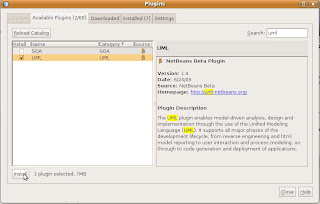


Below video illustrate reverse rngineering feature NB's UML Module
NetBeans And UML
To enable UML Module in IDE click on menu Tools--->Plug-in. The below pop-up will appear. Search UML in search textbook,click UML and push install button. The UML Module will install and ready for use after reboot your IDE.

NetBean's UML Module offer the functionality of creating activity diagram,class diagram,sequence diagram,state diagram and use case diagram in a platform and language independent way. It also provides the forward engineering and reverse engineering option for Oops diagrams in a very user friendly way.
I found few images which I would like share with you to give some feel of NetBean's UML Module.
Following are images.


NetBeans And ERD
The module, I am missing in these days which is ERD Module of Netbeans which was available before 6.x version but not yet available for current NB 6.7 release, as their commitment it will be available with netbeans 6.8.

In short we have lot of open source options to work on different diagrams we already talked about Argouml ,DB designer ,DIA and other different options . I love Netbeans way, reason it provides every thing with in one umbrella.
Refrences
Complete tutorial for UML Diagrams in Netbeans
http://www.netbeans.org/kb/60/uml/
Below video illustrate reverse rngineering feature NB's UML Module
Wednesday, August 5, 2009
Microsoft Visio's Open Source Alternatives(2/3)
In my last blog entry I shared one open source software ArgoUML which targeted to all UML diagrams .In today's we will see two another open source softwares which mostly I use in my profession to create diagrams, first one targets to ERD or db diagrams with name DB Designer who can does more then visio as ERD or DB is concern and second one targets to all type of diagrams with the name DIA, calls roughly inspired by the commercial Windows program 'Visio'
DB Designer
 | Db Designer is a visual database design system that integrates database design, modeling, creation and maintenance into a single, seamless environment.It combines professional features and a clear and simple user interface to offer the most efficient way to handle your databases.I simply call it "Too rich in all database related modeling". |
Some of the listed features are
- Available on Linux / MS Windows
- User Interfaced based on industry standard layouting software(Canvas navigation similar to Adobe Illustrator and Photoshop,Palettes (docked / floating) including "Bird Eyes view",Available objects include tables, realtions, labels, regions, images,Extensive Drag'n'drop support,Extensive Popup-Menu support,Advanced Editors,UNLIMITED Undo-/Redo- functions,Copy-/Cut-/Paste clipboard functions (XML, DDL),Align functions etc).
- Design Mode / Query Mode
- Reverse engineering MySQL, Oracle, MSSQL and any ODBC databases
- Userdefined schema-generation
- Model-To-Database syncronisation
- Index support
- Automatic foreign key placement
- Weak entity support
- Standard Inserts storing and sync
- Full documentation capabilities
- Advanced model printing
- Output as image
- All MySQL datatypes with all options
- User defined datatypes
- Database storage, ability to save model within database
- Network-/Multiuser access through database storage
- Version control
- SQL Query Builder
- SQL Command History
- SQL Command storage within model
- Plugin interface

Dia is roughly inspired by the commercial Windows program 'Visio', though more geared towards informal diagrams for casual use. It can be used to draw many different kinds of diagrams. It currently has special objects to help draw entity relationship diagrams, UML diagrams, flowcharts, network diagrams, and many other diagrams. It is also possible to add support for new shapes by writing simple XML files, using a subset of SVG to draw the shape.
I like its one really cool feature which calls creates new shapes .It is perfect free alternative of Visio which available for widows and linux but one con ,not for me, it is not a very much user friendly like Microsoft Visio.
To see DIA complete documentation click here
Conclusion:
ArgoUML ,DBDesigner and DIA are providing the perfect open source free alternative for Microsoft Visio.I am professionally using these softwares for designing artifacts ,modeling softwares diagrams and other flow diagrams, Some other alternatives are also available which I haven't experienced other softwares and complete list of Microsoft Visio alternative available at below link
http://alternativeto.net/desktop/microsoft-visio/?platform=windows
Saturday, August 1, 2009
Microsoft Visio's Open Source Alternatives(1/3)

Most of the peoples are too much use to with Microsoft Visio.In today's blog entry I will discuss some open source alternatives of Microsoft Visio and we will see how rich these tools are in terms of their features and functionalities and I personally prefer these tools over Microsoft Visio .Not just only these tools are free/open source but also due to these tools are more user friendly and rich in their functionalities.

I am going to discuss just few tools which I explored personally which are
- Argo UML (Targeted for all UML Diagrams)
- DB Designer(Targeted to only ERD Diagram)
- DIA (Too rich tool all type modeling diagram including UML,ERD,Network diagram etc)
- Netbeans Plugins (I like too much because I can build artifact under one umbrella
Today I will just discribe ArgoUML features and in next two blogs I will describe other remaining tools ArgoUML
ArgoUML is a powerful yet easy-to-use interactive, graphical software design environment that supports the design, development and documentation of object-oriented software applications. Like many other UML tools of this caliber ArgoUML provides code generation. The following programming languages are support for code generation: Java, C++, C# and PHP. The Java support is best since it can be used for round-trip engineering using the reverse engineering feature. ArgoUML also has partial support for user models such as decision model, goals model, etc. Finally diagrams can be exported in many graphical formats, primarily GIF, PNG, PS and SVG.
Main features:
- Open standards: UML ,XMI, SVG and PGML
- 100% Platform independent thanks to the exclusive use of Java
- Open Source, which allows extending or customizing.
- Cognitive features like: reflection-in-action, opportunistic design, comprehension and problem solving
- It is able to create and save most of the nine standard UML diagrams.
- Ease of use and User friendliness
- Reverse Engineering and Code generation
How to install ArgoUML?
http://argouml-stats.tigris.org/documentation/quick-guide-0.28/ch02.html
How to Use ArgoUML?
http://argouml-stats.tigris.org/documentation/manual-0.28/

Monday, July 27, 2009
Voice chat with Google talk user using Empathy Messenger
Few days back one of my unknown friend called me and asked to me that can we do voice chat on Ubuntu Linux with Google talk? and he told me that Pidgin and Gaim messengers don't support voice chat with Google talk in current release(Pidgin is working on video and voice support for details click on link).At that time I don't know its detail, After doing some search I got solution for this matter.
We can do voice with Google talk on Ubuntu using Empathy Messenger. Empathy Messenger consists of a rich set of reusable instantmessaging
widgets, and a GNOME client using those widgets. It uses Telepathy and Nokia’s Mission Control, and reuses Gossip’s UI. To Setup Empathy and Google talk click here
We can do voice with Google talk on Ubuntu using Empathy Messenger. Empathy Messenger consists of a rich set of reusable instant
Sunday, July 26, 2009
The Free and Open Productivity Suite
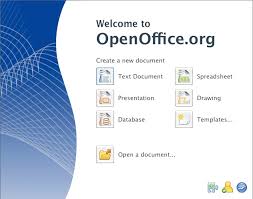 Open office (OO)3.1 is available for download(since May 2009) with great improvements and many new rich features. I agree Microsoft is leader as far as office products is concern but what point I am willing to discuss here, what normal users requires and what features most of the peoples are using. All features provide us to open office with great user friendly way, I am not geek office user but what I need I got from open office.
Peoples ask to me, Is Open Office is compatible with Ms office 2007 ,then I ask to those people Is Ms Office 2007 compatible with Open Office .You can easily open Ms office 2007 file (docx,pptx) on Open Office and can edit and save it on 2003 doc formate but Ms office 2007 not provides this functionality in inverse.
I gather few of users experiences from Internet and feature of Open Office what it provides free of cost which I `would like to share with you .
Features
- Free Of Cost
- Easy to Use
- Multi-Platform
- Multi-lingual
- Compatible with all office suit including Ms Office 2003/2007 (Ms Office is not compatible)
- Power full extensions/plug-ins
- Almost provides all features of Ms office in a user friendly way
- Periodically updates and new releases
- etc
Below are some user experiences
http://openoffice.blogs.com/openoffice/2009/06/openofficeorg-31-outline-level-feature-.html
Conclusion :
Use free office suit OO ,it provides all functionality which we required (Ubuntu built in installs OO as Office productivity tool)and make piracy free Pakistan

Friday, July 24, 2009
Adobe Photo Shop On Ubuntu
Ubuntu provides GIMBS software as alternative of Adobe Photo shop but its not too much rich as Adobe Photo shop so you can run adobe photo using wine see below link for configuring Photo Shop
http://luiscosio.com/how-to-adobe-photoshop-cs2-on-ubuntu-10-steps
http://wiki.winehq.org/AdobePhotoshop
http://luiscosio.com/how-to-adobe-photoshop-cs2-on-ubuntu-10-steps
http://wiki.winehq.org/AdobePhotoshop
Tuesday, July 21, 2009
open-source security framework
Apache Shiro is a powerful and flexible open-source security framework that cleanly handles authentication, authorization, enterprise session management and cryptography.
see below linkhttp://cwiki.apache.org/SHIRO/index.html


Enable XDMCP protocol in Terminal Server Client ubuntu
XDMCP (X Display Manager Control Protocol) to provide a solution for the X-Terminal and to provide a platform of efficient Remote X Apps environment.
To enable XDMCP in ubuntu install xnest using command
sudo apt-get install xnest
after installing xnest
Navigate to Application---> Internet ---> Terminal Server Client
XDMCP protocol is enable in Terminal Server Client in utility
To enable XDMCP in ubuntu install xnest using command
sudo apt-get install xnest
after installing xnest
Navigate to Application---> Internet ---> Terminal Server Client
XDMCP protocol is enable in Terminal Server Client in utility
Open Source Options for Project Management Tools
A very good link related to open source project management tools. I am currently using OpenGoo for this purpose which is also listed in this article.
http://www.cyberciti.biz/tips/open-source-project-management-software.html
http://www.cyberciti.biz/tips/open-source-project-management-software.html
Saturday, July 18, 2009
Virtualization Alternatives
Virtualization is the method by which guest operating systems can run within another "host" operating system
Available Options for virtualization as my knowledge
- Sun VirtualBox
- Virtual Pc for Microsoft (I don't discuss here, people complaining about its performance lack and other integration issue on web) .
- VMWare Server (I don't discuss here,Its not user friendly ,lightweight as virtualbox)
Some VirtualBox features written on its website (which I tested myself) which are:
- Modularity. VirtualBox has an extremely modular design with well-defined internal programming interfaces and a client/server design. This makes it easy to control it from several interfaces at once: for example, you can start a virtual machine in a typical virtual machine GUI and then control that machine from the command line, or possibly remotely. VirtualBox also comes with a full Software Development Kit: even though it is Open Source Software, you don't have to hack the source to write a new interface for VirtualBox.
- Virtual machine descriptions in XML. The configuration settings of virtual machines are stored entirely in XML and are independent of the local machines. Virtual machine definitions can therefore easily be ported to other computers.
- Guest Additions for Windows and Linux. VirtualBox has special software that can be installed inside Windows and Linux virtual machines to improve performance and make integration much more seamless. Among the features provided by these Guest Additions are mouse pointer integration and arbitrary screen solutions (e.g. by resizing the guest window).
- Shared folders. Like many other virtualization solutions, for easy data exchange between hosts and guests, VirtualBox allows for declaring certain host directories as "shared folders", which can then be accessed from within virtual machines.
A number of extra features are available with the full VirtualBox release only (see the "Editions" page for details):
- Virtual USB Controllers. VirtualBox implements a virtual USB controller and allows you to connect arbitrary USB devices to your virtual machines without having to install device specific drivers on the host.
- Remote Desktop Protocol. Unlike any other virtualization software, VirtualBox fully supports the standard Remote Desktop Protocol (RDP). A virtual machine can act as an RDP server, allowing you to "run" the virtual machine remotely on some thin client that merely displays the RDP data.
- USB over RDP. With this unique feature, a virtual machine that acts as an RDP server can still access arbitrary USB devices that are connected on the RDP client. This way, a powerful server machine can virtualize a lot of thin clients that merely need to display RDP data and have USB devices plugged in.

Vista Run Over Ubuntu Host
References
http://www.virtualbox.org/wiki/VirtualBox
http://www.brighthub.com/computing/windows-platform/articles/29183.aspx
http://www.mangoorange.com/2007/07/05/5-reasons-why-you-should-use-virtualbox-instead-of-virtualpc-or-vmware/
Subscribe to:
Posts (Atom)